
Beyond the Workflow Engine: Building an Enterprise Workflow Platform with Temporal
Connecting durable execution, reusable backend APIs, and a business-friendly user experience.

At the end of Part 1, an insurance claim was waiting for an adjuster. Temporal could preserve that wait through worker restarts and infrastructure failures. But an adjuster cannot work from a durable wait alone.
They need a task in an inbox, the right documents, a clear explanation of the review, and a safe way to submit a decision. A supervisor needs to see overdue work. A partner may need to perform the same actions from its own application.
These requirements turn an execution engine into a product. This article designs that product around React, a TypeScript backend and Temporal workers, and PostgreSQL. The insurance example is fictional; the architecture also applies to onboarding, purchasing, loan processing, and other processes that combine automated work with human judgment.
1. Start with the people who must complete the work
Before drawing service boundaries, describe what success looks like for each participant.
| Participant | Needs to accomplish | What the platform must explain |
|---|---|---|
| Customer | Create a claim, submit evidence, respond to questions | What is missing and what happens next |
| Adjuster | Find, claim, review, approve, or reject work | Why this task exists and which decisions are allowed |
| Supervisor | Reassign work and handle overdue cases | Who owns the next action and where delays occur |
| Support engineer | Investigate failures and recover safely | Which execution, dependency, and operation need attention |
| Partner application | Start and follow claims through APIs | The same business rules and outcomes as the default UI |
Temporal's Web UI helps engineers inspect executions. Our application needs a separate business experience with forms, evidence, ownership, and decision reasons. A Temporal Activity Task or Workflow Task is an internal unit of execution; neither is automatically an adjuster's inbox item.
The business task is a platform concept we model explicitly.
2. Put a reusable backend between clients and execution
A headless platform exposes its capabilities through APIs so several interfaces can use them. The default React application, a mobile client, and a partner portal all call the same business endpoints.
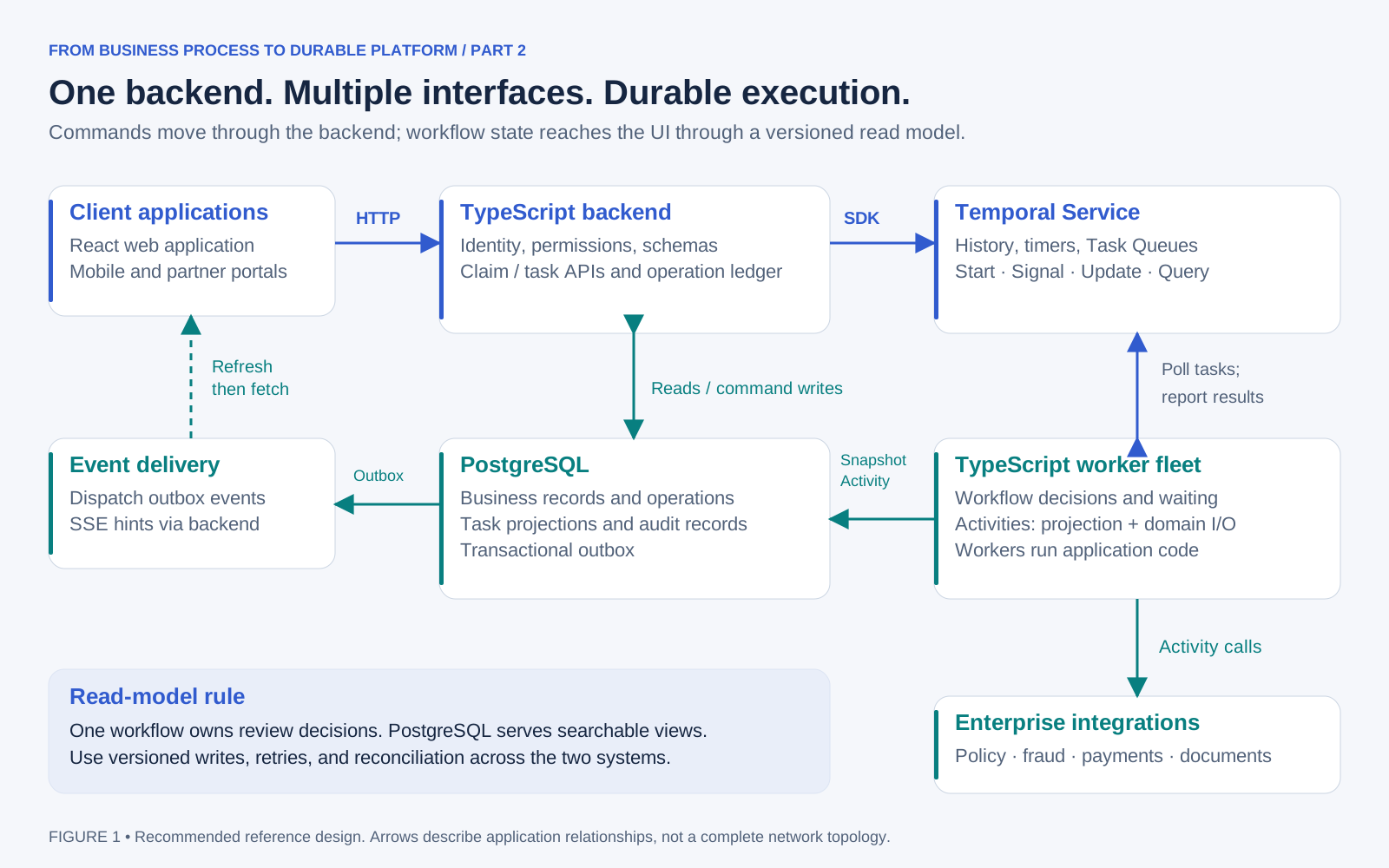
Figure 1. The backend provides the business boundary; worker code performs execution and external integration.
The backend verifies identity, checks permissions, validates inputs, and maps a claim or task ID to its workflow. It translates requests into Temporal operations and returns business responses. Browsers receive neither Temporal credentials nor database access.
Workers run separately from the HTTP API so their capacity and deployments can evolve independently. Workflow code coordinates decisions and waiting. Activities perform database writes, document access, and calls to external services. The Temporal Service stores execution history and coordinates task delivery; workers poll it and run application code. Temporal Workers
Start with a modular backend containing claims, tasks, authorization, and reporting modules. These can share a deployment initially. Separate services when ownership, security, or scaling provides a concrete reason.
3. Give each kind of state one owner
Suppose a database row says “approved,” while the workflow is still awaiting review. Which answer should the platform trust?
Avoid this ambiguity by choosing ownership before synchronization.
| Information | Authority in this design | UI access |
|---|---|---|
| Claim facts, policy evidence, settlement records | Respective domain services or domain tables | Backend joins authorized business data |
| Active review, assignee, deadline, decision, transition version | Claim workflow | Projected task records; targeted workflow reads where needed |
| Searchable inbox and display status | PostgreSQL projection of workflow state | Filtered, paginated backend reads |
| Photos and documents | Object storage with domain metadata | Authorized download links |
| Identity and organizational permissions | Identity provider and authorization policy | Backend enforcement |
| Technical history versus business audit | Temporal history versus dedicated audit records | Separate engineering and business views |
A projection is a stored view optimized for reading. It lets PostgreSQL answer “show my overdue motor claims” without querying every workflow.
Here, workflow decisions produce versioned snapshots through an idempotent Activity. That Activity updates the task projection and adds an audit/outbox event in one database transaction. An outbox is a table of committed events awaiting delivery; its dispatcher can notify connected screens reliably.
There is no shared atomic transaction across PostgreSQL and Temporal. If the write fails, the Activity retries. If the write succeeds but its acknowledgement is lost, repeating it must be harmless. A unique event ID and monotonically increasing task version prevent duplicate audit entries and older snapshots overwriting newer ones.
Add reconciliation to find lagging records and repair them from authoritative state. Preserve a final snapshot before closing the workflow, and retain business records according to business policy. Temporal's Visibility index can help locate executions, but it is eventually consistent and should not decide whether an approval is still valid. Temporal Visibility
4. Design APIs around business operations
Creating a draft claim and starting its execution are different operations. A draft may need editing before submission; submission fixes the input version that the workflow will process.
| Capability | Example endpoint | Contract |
|---|---|---|
| Create or edit a draft | POST /claims, PATCH /claims/{id} |
Validate and save business data |
| Submit and start | POST /claims/{id}/submit |
Record submission intent and return an operation ID |
| Follow an operation | GET /operations/{id} |
Report pending, confirmed, rejected, or failed |
| List or inspect claims | GET /claims, GET /claims/{id} |
Return authorized status, details, and freshness |
| List or inspect tasks | GET /tasks, GET /tasks/{id} |
Filter by owner, group, state, and due date |
| Claim or reassign work | POST /tasks/{id}/claim, /assign |
Request a version-checked ownership change |
| Submit a decision | POST /tasks/{id}/decisions |
Approve, reject, or request information |
| Attach evidence | POST /claims/{id}/documents |
Associate a validated document reference |
| Request cancellation | POST /claims/{id}/cancellation-requests |
Apply the process's cancellation policy |
| Inspect progress | GET /claims/{id}/timeline |
Return a business timeline with redacted details |
For submission, save the immutable input reference and a start command in one PostgreSQL transaction. A dispatcher starts the workflow using a stable, tenant-scoped Workflow ID. Configure conflict/reuse behavior deliberately so retrying the same submission finds the existing execution. Keep a durable business deduplication record beyond workflow retention.
Task completion does not necessarily complete the claim: approving a review can unlock payment. Likewise, a rejected claim can be a successfully completed workflow with a business outcome of REJECTED. Avoid a universal “mark workflow complete” button.
Publish an OpenAPI contract with runtime schemas, cursor pagination, error codes, and compatibility rules. TypeScript types alone do not validate requests from another application.
5. Follow an approval from click to durable decision
Temporal provides several interaction mechanisms. Pick one based on the response the business action needs.
| Mechanism | Use in this platform |
|---|---|
| Start Workflow | Begin processing a submitted claim |
| Signal | Deliver an asynchronous event such as new evidence; receipt does not confirm processing |
| Update | Request a decision and obtain a workflow result |
| Query | Read application-defined workflow state without changing it |
| Describe | Inspect execution metadata and lifecycle status |
An Update fits approval because the adjuster needs to know whether the workflow accepted the decision. Updates have distinct acceptance and completion stages; neither automatically means the entire claim has finished. Queries require worker execution and do not replace a database for large inbox searches. Temporal message passing
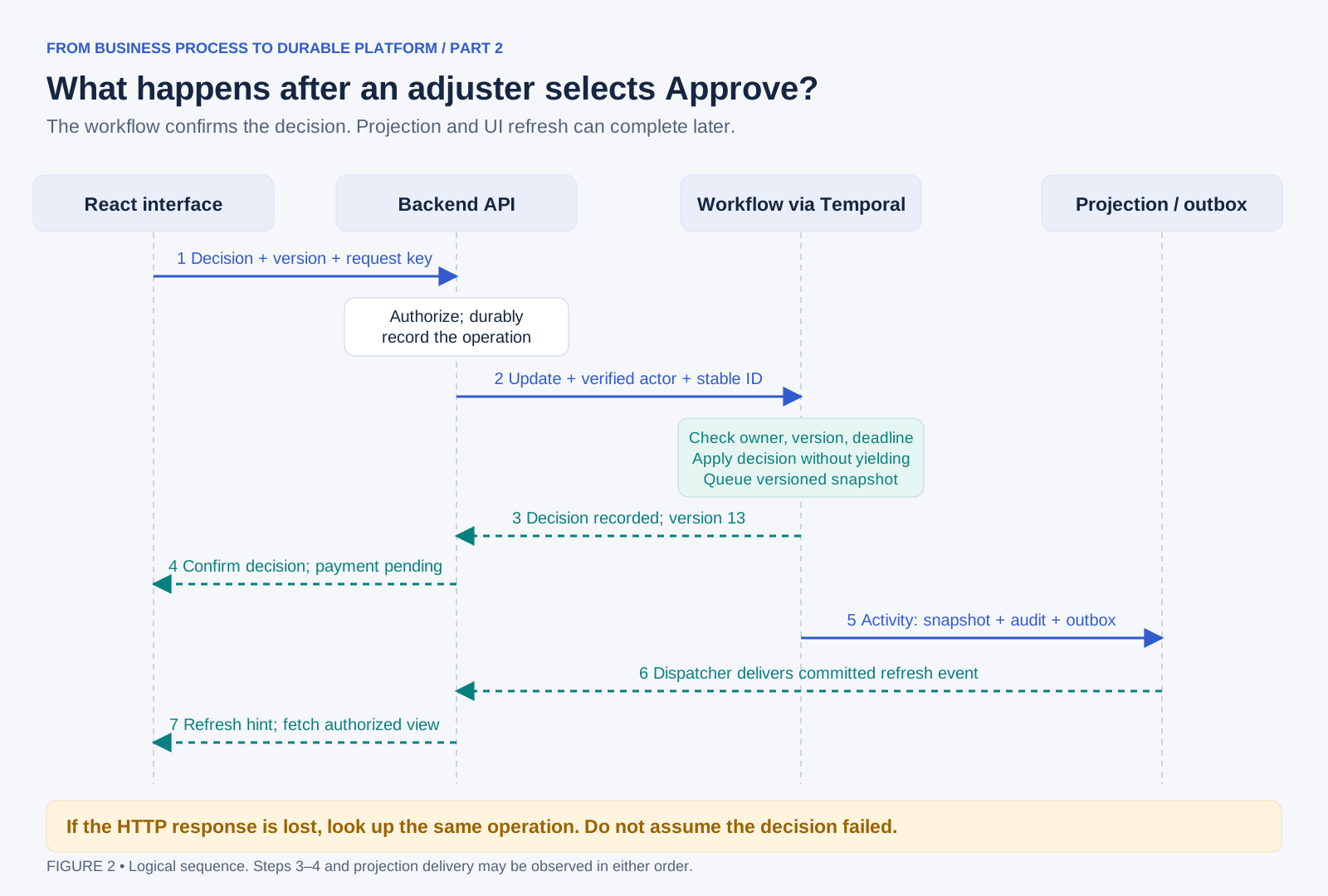
Figure 2. The decision result and the refreshed inbox are related, but they may arrive at different times.
A request might look like this:
POST /tasks/review-48271/decisions
Idempotency-Key: decision-48271-7f2a
Content-Type: application/json

{
  "expectedVersion": 12,
  "outcome": "APPROVE",
  "reason": "Evidence supports the assessed claim"
}
The backend derives the actor and tenant from verified authentication. It binds the request key to the actor, resource, and payload; reusing that key with different contents is an error. It records an operation before contacting Temporal, and uses a stable Update ID for retries.
The workflow rechecks the task version, owner, permitted transition, and deadline. In this design, one short handler changes the decision state without yielding. A simplified version is:
on decide(command):
    if command.id already processed:
        require the same payload fingerprint
        return the saved result

    require task.version == command.expectedVersion
    require task.owner == command.verifiedActor
    require task is reviewable and deadline has not passed
    require outcome and reason satisfy the task rules

    task = applyDecision(task, command)
    task.version += 1
    result = remember(command.id, task.version, task.outcome)
    enqueueProjectionSnapshot(task)
    return result
This is design pseudocode, not a complete SDK implementation. The snapshot queue is workflow state; a workflow loop drains it through Activities. All competing handlers use the same transition rules. If a handler must await external work, protect its reservation and recheck state after yielding. Temporal's TypeScript guide explains asynchronous handler interleaving and read-only validators. TypeScript message handlers
A 200 response means the decision command completed. Payment may still be pending. If the HTTP wait expires, return a tracked pending operation only when its durable record exists; a timeout is not proof of rejection. Retrieve the existing result before offering a new attempt.
6. Make human tasks a deliberate state machine
A task needs an ID, claim reference, task type, candidate group, owner, version, due date, form version, and decision history. Use identifiers that include the review round, so a second assessment cannot be confused with the first.
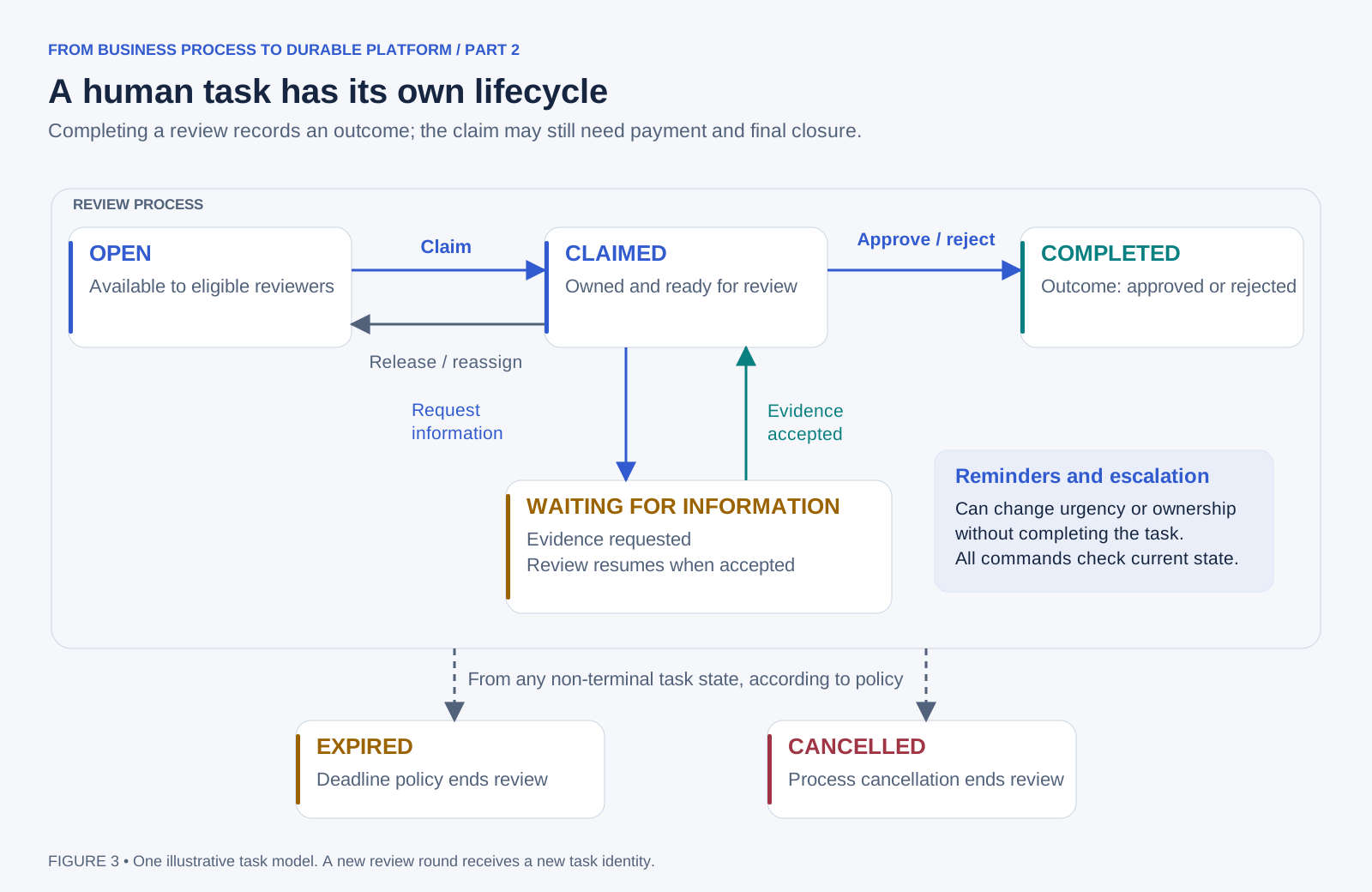
Figure 3. Approval and rejection are outcomes of a completed review. They are separate from the claim's eventual payment or closure.
When two adjusters claim the same task, the workflow accepts one eligible transition and rejects the stale request. Disabling a button helps the interface, but backend and workflow checks provide correctness.
Requesting more information suspends review. A verified document event can make the task reviewable again. Timers trigger reminders or deadline handling without holding a thread open. Explicitly define whose clock and calendar apply: elapsed time and “two business days” are different requirements.
Escalation may change assignment or priority without completing the task. Expiry, cancellation, and late decisions need explicit rules. For deadline races, define whether eligibility uses workflow processing time or another recorded policy; do not trust the browser's click timestamp.
7. Give the UI enough context to support judgment
An adjuster should understand the next action without learning Workflow IDs, Activity attempts, or Event History.
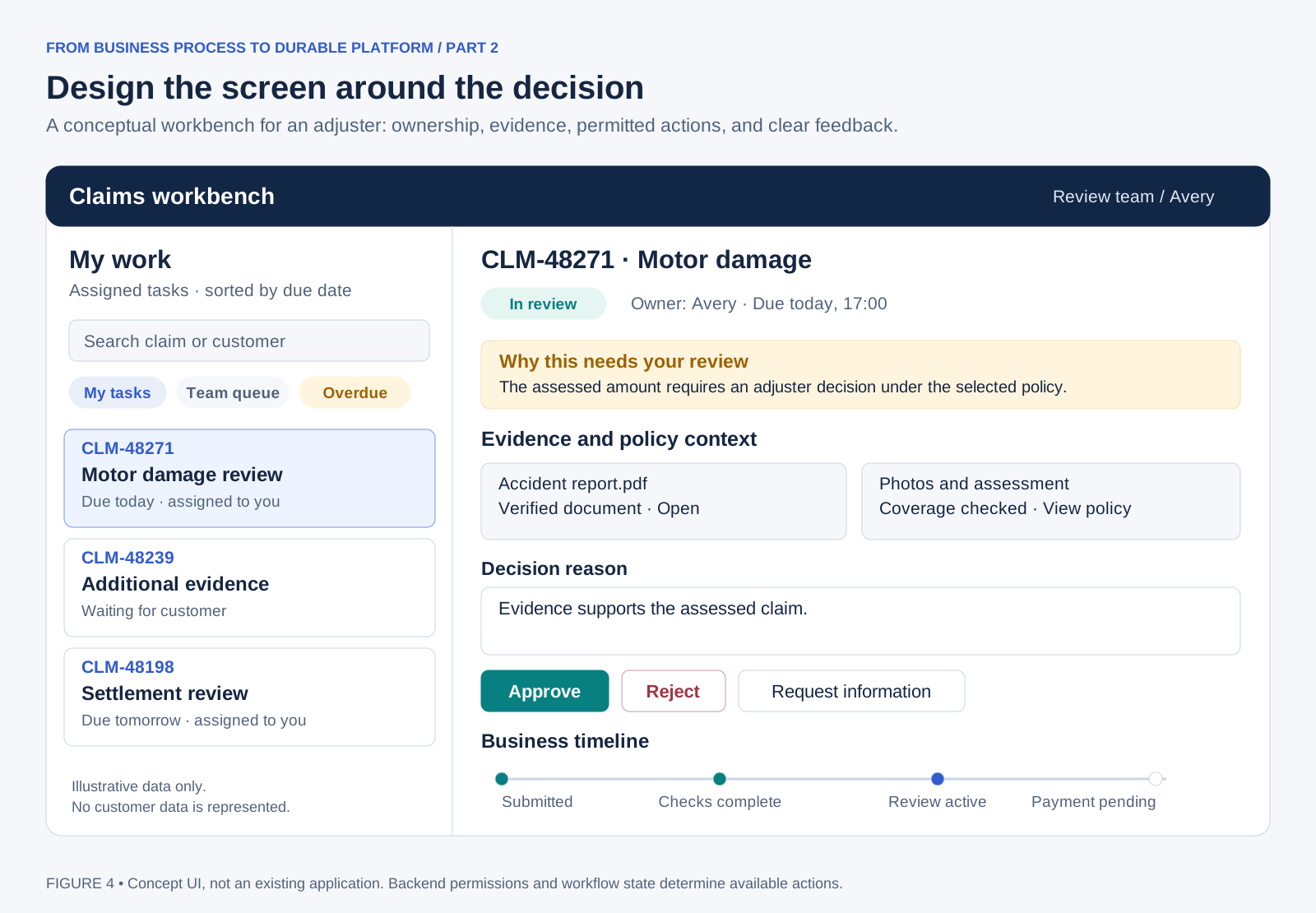
Figure 4. Illustrative UI design using fictional data. It is not a screenshot of an existing application.
The inbox needs meaningful filters, ownership, deadlines, and a clear distinction between waiting, actionable, and overdue work. The detail view should explain why review is needed, show evidence and policy context, and put the decision form near the information supporting it.
The backend returns permitted actions and versioned form metadata; the UI renders them consistently. The server validates every submitted action again. A partner can render a different interface from the same contract.
Use precise feedback: “Decision recorded; payment pending” is more useful than “Success.” If the command result is newer than the inbox projection, retain that confirmed result until the projection catches up. Do not replace it with older fetched data.
Keep entered comments after a recoverable failure, provide keyboard navigation and visible labels, explain validation beside the field, and never rely on color alone. After reconnection, refresh authoritative details before enabling a previously available action.
For non-technical users, start with approved process templates and guided forms. Starting a workflow, configuring a template, and authoring a new process are separate capabilities. A visual designer requires a versioned definition format, validation, approval, and an execution strategy of its own; Temporal's code workflows do not automatically turn a drawn diagram into an executable process.
8. Choose how screens learn about changes
An open browser does not automatically receive Temporal events. The backend must expose the update channel.
| Approach | Good fit | Cost or limitation |
|---|---|---|
| Polling | First release, moderate usage, tolerant refresh delay | Repeated reads; use backoff and pause hidden tabs |
| Server-sent events | Inbox and timeline notifications from server to browser | Reconnection, authorization, and proxy timeouts need design |
| WebSockets | Collaborative interaction needing frequent messages in both directions | More connection and operational complexity |
I would begin with polling and add server-sent events when faster feedback materially helps users. SSE is a one-way stream; ordinary HTTP requests still carry decisions. MDN's SSE guide
Publish notifications after the database transaction commits. Send a resource ID and version, then let the browser fetch fresh authorized data. On reconnect, resume from an event cursor or refetch. Treat notifications as refresh hints, never as the only surviving record of a decision.
9. Explain actions and protect every entry point
Three views serve different purposes. A customer timeline explains business progress. An audit record explains who acted, under which authority, with what reason and result. Technical logs, traces, and Temporal history explain execution behavior.
Connect them with tenant, claim, task, workflow, run, and operation identifiers. Keep technical logs behind privileged endpoints or support tooling. Recording an Update in Temporal does not by itself satisfy every business audit or retention requirement, especially if an application service account is the caller.
Enforce tenant scope and resource permission on every read and command. Check assignment, approval limits, and separation-of-duties rules in the backend and relevant workflow transitions. A hidden button is not authorization. Workflow IDs and Task Queues are not access-control boundaries.
For the database, PostgreSQL row security can add protection, but table-owner and privileged-role bypass behavior must be considered. It supplements application checks. PostgreSQL row security
Keep large documents in object storage, passing references and versions through the workflow. Minimize sensitive payloads and logs; use payload encryption where needed, with a deliberate key-retention plan. Search Attributes require separate scrutiny because payload codecs do not encrypt them. Temporal codecs and encryption
10. Choose a stack the team can operate
For this reference design, my choice is React with TypeScript, NestJS, separate TypeScript Temporal workers, and PostgreSQL. It gives the interface and backend a common language while retaining a useful separation between HTTP handling and durable execution.
| Layer | Reference choice and advantage | Trade-off and alternative scenario |
|---|---|---|
| Business UI | React + TypeScript: reusable forms and task components | Teams must choose routing and data patterns; Angular suits teams wanting stronger framework conventions |
| HTTP backend | NestJS: modules, dependency injection, and explicit service boundaries | More framework ceremony; Fastify suits a smaller team wanting a thinner API layer |
| Durable workers | Temporal TypeScript SDK: familiar language and testable workflows | Deterministic code must be isolated from I/O; Java suits established JVM teams, Go suits teams already operating Go services |
| Business storage | PostgreSQL: transactions, constraints, indexes, and relational reporting | Projections and migrations need ownership; add a search engine only when search requirements justify another system |
| Documents | Managed object storage: durable file storage independent of workflow history | Requires scanning, authorization, lifecycle, and access-link controls |
| Identity | Existing enterprise OpenID Connect provider | Application permissions still need modeling; a self-managed provider adds operational responsibility |
| Observability | OpenTelemetry plus the organization's monitoring tools | Instrumentation and retention cost need control; combine business metrics with execution signals |
| Runtime | Managed containers for API and worker deployments | Choose Kubernetes when an established platform team needs its controls; it is not a prerequisite |
These are design recommendations, not benchmark rankings. React's component model, Nest's structure, Fastify's schema validation, and OpenTelemetry's telemetry model are documented in their respective guides: React, NestJS, Fastify, and OpenTelemetry.
For Temporal, a managed service reduces the cluster operations your team owns; you still own application behavior, workers, and integrations. Self-hosting gives infrastructure control but adds capacity planning, upgrades, persistence, and recovery operations. Choose based on organizational constraints and operating capability. Temporal deployment options
11. Test what happens when the happy path breaks
Production design should answer concrete failure questions:
A payment succeeds but its response is lost: reuse one provider-enforced idempotency key for that business payment, including across retries. A new attempt number must not create a new payment identity.
The task projection falls behind: retain the command result, alert on projection lag, and reconcile. Do not report a failed approval merely because an inbox refresh is late.
A workflow version changes mid-claim: choose Worker Versioning with an explicit pinned or upgrade policy. Keep required versions available and test compatibility. Pinning worker code does not freeze an external API or database schema. Worker Versioning
One workload overwhelms workers: monitor backlog age and task waiting time; scale pools and protect downstream APIs with limits. Evaluate Temporal's task priority and fairness features for shared workloads, checking support in your chosen SDK before adoption. Priority and fairness
Cancellation arrives after an external action: follow an explicit cancellation and compensation policy. Compensation is another business action that can fail; record unresolved recovery work.
Test duplicated commands, two reviewers racing, expired tasks, worker loss, lost acknowledgements, projection retries, and cross-tenant access. Use Temporal's test environment for controlled workflow tests, including time skipping, and add API contract and browser tests for the business journey. TypeScript testing
Set recovery objectives across the whole system: Temporal, PostgreSQL, object storage, identity, and the external services. An engine's durability cannot compensate for a missing document backup or an unavailable identity provider.
12. Build one complete journey, then generalize
Deliver a narrow path first: submit one claim type, create one review task, accept a decision, complete a simulated payment, and expose a timeline. Include failure behavior in that first slice.
Next, add permissions, reassignment, information requests, stable APIs, and a second client. Then strengthen reconciliation, deployment safety, monitoring, and capacity planning. Extract shared task and form capabilities when a second process demonstrates what is genuinely common.
Measure time to first review, overdue work, total claim duration, interventions, decision conflicts, and projection lag. Count completed business outcomes alongside worker health.
Our adjuster can now find the claim, inspect its evidence, record a decision, and understand what follows. A partner can perform the same journey through its own UI. Temporal keeps the process durable; the backend and interface make that durability useful to people.
A future deep dive can examine the command ledger and outbox implementation, safe workflow evolution, compensation, multi-region recovery, and governed workflow authoring in detail.

